Categories
Uncategorized

Debian 11 – PHP 7.4.33

Still have a server running with Debian 11 and PHP 7.4.33 and are looking for a patched set of Debian packages to in the short term fix the recent CVE-2026-109618 and CVE-2026-109619 finding?

The easy way could be to checkout sury.org and use their repo https://packages.sury.org/php/ Checkout the Readme.txt and you should quickly have updates from a platform which keeps more updates then I do.

But I went the other way, because I like a challenge and to do it my own way 🙂 . I downloaded the PHP 7.4 CVE branch which the PHP devs provided. I then made a diff between the last PHP 7.4.33 sources to see what changes were made to this PHP branch to secure it against exploits described in CVE-2026-109618 and CVE-2026-109619.

Next I wanted to build a Debian 11 package like it would have come from security.debian.org. So I downloaded the last released Debian source package for php7.4 and extracted it. I applied that patch and fix a few issues as the patch command was not able to apply it fully. I then updated the debian changelog file and added that it fixes the CVEs and then let it build a new package: php7.4-7.4.33-1+deb11u13

So here is a downloadable tar with patched packages in a sub-folder: Download php7.4-7.4.33-1+deb11u13.tar.gz \

It should install the packages with the +dev11u13 extension in line with the Debian packaging mantra.

To validate the pakcages here are md5sums:
45b0eab43714b6eb5f9ae4337f49aa2a  libapache2-mod-php7.4_7.4.33-1+deb11u13_amd64.deb
09751831c72a400fac94a7522c5eccad  libphp7.4-embed_7.4.33-1+deb11u13_amd64.deb
eceb998bc6185f645891e93d8705a671  php7.4_7.4.33-1+deb11u13_all.deb
39266ce981e033e8dc68c04a5993a49b  php7.4-bcmath_7.4.33-1+deb11u13_amd64.deb
d5df81c794be2b476fa73beabb513dee  php7.4-bz2_7.4.33-1+deb11u13_amd64.deb
76e2cc1d52e02c9132c43c3ddca362ae  php7.4-cgi_7.4.33-1+deb11u13_amd64.deb
5375b91e0b36f26bcaf5b468bf0fecb0  php7.4-cli_7.4.33-1+deb11u13_amd64.deb
fc348e81989d57e7a14bae9db93cff4f  php7.4-common_7.4.33-1+deb11u13_amd64.deb
f9ee2419547b6eca8ed377ae59e09b4e  php7.4-curl_7.4.33-1+deb11u13_amd64.deb
c94fb70e75d684c032944097d2965695  php7.4-dba_7.4.33-1+deb11u13_amd64.deb
6a8472c7759731730cd20cebe6e366ec  php7.4-dev_7.4.33-1+deb11u13_amd64.deb
156c157aa35a9361464241199e41e382  php7.4-enchant_7.4.33-1+deb11u13_amd64.deb
f7dd8bf204ee78e78dc1a3ed44cc70ef  php7.4-fpm_7.4.33-1+deb11u13_amd64.deb
41425419ccb8f0abe58429c4dc205ae3  php7.4-gd_7.4.33-1+deb11u13_amd64.deb
0f70f363c6f0d06eab1bd2a7c28bc314  php7.4-gmp_7.4.33-1+deb11u13_amd64.deb
bd1e04743b5a00d9aa55e037e261e2e6  php7.4-imap_7.4.33-1+deb11u13_amd64.deb
3580874b8e2949b4b65f47d4836ef15f  php7.4-interbase_7.4.33-1+deb11u13_amd64.deb
17b65a44d222e3e41bc762a631e6db8d  php7.4-intl_7.4.33-1+deb11u13_amd64.deb
a259feca58879a1af3db214e01f676da  php7.4-json_7.4.33-1+deb11u13_amd64.deb
decb6281ac4c77ae7faeddc44a57371f  php7.4-ldap_7.4.33-1+deb11u13_amd64.deb
cbb555df033218d9c8af19bb371882d4  php7.4-mbstring_7.4.33-1+deb11u13_amd64.deb
44cc3d187bffcf06d25898267a25e40a  php7.4-mysql_7.4.33-1+deb11u13_amd64.deb
88caf4c3849443cf78e37bf80c962761  php7.4-odbc_7.4.33-1+deb11u13_amd64.deb
d030ef5550049ed78c18de7641f7ab2c  php7.4-opcache_7.4.33-1+deb11u13_amd64.deb
1ff2fa5b26258aa67fcbc43f8acff910  php7.4-pgsql_7.4.33-1+deb11u13_amd64.deb
b4236f81ae0083029a35786023075851  php7.4-phpdbg_7.4.33-1+deb11u13_amd64.deb
41c92f2f19ffd7e36c2c794bb5e47446  php7.4-pspell_7.4.33-1+deb11u13_amd64.deb
3d1833291fa0178035e478ae4c5684c0  php7.4-readline_7.4.33-1+deb11u13_amd64.deb
50e418e61223614072119a629e31440f  php7.4-snmp_7.4.33-1+deb11u13_amd64.deb
ea620c06e5e554c7afb761bad93c390e  php7.4-soap_7.4.33-1+deb11u13_amd64.deb
7438022fa6dab38a6f0c8c70a370c98e  php7.4-sqlite3_7.4.33-1+deb11u13_amd64.deb
64e6576d476a9e2e643a2a6dcb402996  php7.4-sybase_7.4.33-1+deb11u13_amd64.deb
80f76703126bd360b3890bcec3ce7842  php7.4-tidy_7.4.33-1+deb11u13_amd64.deb
ef96e78e28d4f215ffb7ac1277dd5b84  php7.4-xml_7.4.33-1+deb11u13_amd64.deb
409c0ebac81f432e31c8420c173ac865  php7.4-xmlrpc_7.4.33-1+deb11u13_amd64.deb
c58755d656b3577b4f69a5d6d5a126c3  php7.4-xsl_7.4.33-1+deb11u13_all.deb
cfce1d403d7ae06aff5dd39686c82bfc  php7.4-zip_7.4.33-1+deb11u13_amd64.deb

Categories
Uncategorized

Proxmox server Lexar NM790 NVME SSD crash

As an IT nerd I try to use tech to its max and having a Proxmox install in use to maximize use of resources on a laptop server. The laptop is use mainly its for low energy consumption and the build in UPS (aka the laptop battery 🙂 ).

That server hosts a shared storage to keep my photos and make automated backups of those photos. So 2 years ago I upgraded the server to a 2Tb NVME disk of Western Digital and had no issues at all with that.

This year I started to review my photo store on the PC which I use for photo editing and came to the conclusion that the servers disk space was to small to store all the photos I have. So it was time to look for a bigger disk. With the Black Friday deals on their way I also checked some reviews of 4Tb disks on a budget and with decent performance. Which resulted in me buying a Lexar NM790 4Tb for a nice price (thanks for the Black friday deals 🙂 ).

So I migrated the Proxmox OS to it and tested it if it would boot on a different laptop. In the end the migration was fairly painless. The copy speed of the data (1.4Tb!) was around 350Mb/s which was quite impressive. There was a catch though (otherwise I would not write this blog 🙂 ).

The server would crash after a day or so (or sometimes faster) with mixed ext4 errors like:

  • kmmpd: 185 comm kmmpd-dm-16: Error writing to MMP block
  • EXT4-fs error in ext4_reserve_inode_write : Journal has aborted

Not really good for a server which is constanly online for internet proxy and network security purposes. So I needed to find answers how to fix it.. And in the end I found some info with the same trouble with Ubuntu on https://askubuntu.com/questions/1521014/lexar-nm790-4tb-ssd-keeps-crashing-my-fresh-install-of-ubuntu-24-04

There should be a newer firmware for the disk fixing the problem, but adding a windows 10 install to the test laptop and trying the correct tools of Lexar did not result in a firmware update. So I will revert to the other solution provided to stop the disk going into sleep mode which is apparently not working properly with Linux :-(.

I will update the blog post once the server is up and running again with the new disk and it survives a few days of uptime.

The solution will be to add:

nvme_core.default_ps_max_latency_us=0 to the boot line for the kernel.

We should edit the file /etc/default/grub and update the line containing GRUB_CMDLINE_LINUX_DEFAULT and make it look like:

GRUB_CMDLINE_LINUX_DEFAULT="quiet splash nvme_core.default_ps_max_latency_us=0"

Then after updating /etc/default/grub, run the following command:

sudo update-grub
Categories
Blog

Shaping up KumoMTA

POstfix Logo

I have been working in the email marketing industry for over 15 years and I have installed and configured most well known mass-mailers in market. Starting off my professional journey as an Open Source solutions engineer I started implementing Postfix and Exim solutions which are fine for low to mid volume email send outs, but you get in trouble when sending over 100k of mails per hour, let alone trying to send millions of mails in a day.

I will admit that back in the days I have worked on multi postfix installs on one server to create separate queues in order to separate mail streams, but even with that IO lead to be the main bottleneck of this solution.

The next step up in the MTA business back then (2010-ish) were PowerMTA from Port25 and Momentum from Message Systems. Today both solutions are owned by Bird creating a nice vendor lock-in for mass mailing solutions.

As an upgrade to the Postfix solution we migrated to PowerMTA which is very capable of sending millions of mails. It can do rate limiting per domain (and even per queue) and it is very easy configurable. It also can respond to bounces in a sensible way and go in back-off mode if too much of the same bounces happen.

Several years later I also worked with Momentum which had a very advanced way to respond to bounces of ESPs. It was called adaptive delivery and a very nice feature which was miles ahead of PowerMTA to respond clever based on the actual bounce response.

For example if Gmail gives a bounce notification when sending a mail: “Our system has detected an unusual rate”. That means that you need to slow down your sending. Momentum was able to then slow down the sending speed or even suspend send out for 30 minutes or more.

And this is the part I love the most since we come at the technical part of email deliverability, which is making email delivery an easier job. You don’t not need to look at logs anymore in order to change the sending rate or move messages in a slower sending queue. With the adaptive delivery properly setup you can concentrate on the actual content of client emails for even better delivery.

Fast forward to 2022, when I started to implement a small scale email platform based on Postfix and I intended to use a custom made Postfix container configuration with dkim and rate-limit support. Even though that it could do most of the things (in a technical sense) that I required for improved delivery compared to a stock Postfix, those deliverability rules still required manual configuration.

With that in mind I went looking for other solutions and at a certain moment I found KumoMTA . After experimenting with it for some time to find out what KumoMTA was capable off, I joined the KumoMTA Discord in december 2023. KumoMTA replaced the Postfixes used in the small scale email platform to at least remove the manual work to update rate limits.

KumoMTA is a very promising mass-mailing solution for all ESPs, but it still is a relatively young project not having all the bells and whistles which PowerMTA and Momentum have. For me and my project it ticked all features I need and especially the shaping automation is something I was very happy about.

In discussions on Discord with Mike Hillyer about the shaping rules and how to make them, we both were on the same page that in 2024 the rules to react to bounce messages is actually common ground. Most big ESPs like Gmail, Outlook, Yahoo and for example Orange.fr do have postmaster pages explaining what each bounce notification stands for.

Mike’s way of explaining that the MTA is a commodity solution:
“The MTA is like a hotel’s plumbing: it better work, but no-one is picking their hotel based on the plumbing.”

With that concept in mind I started to build on the shaping automation helper in KumoMTA and worked on a shaping.toml file which tries to follow up on the most occurring bounce messages with appropriate measures. To make it the community shaping file in the KumoMTA package.

I started off with the big ones like Gmail, Yahoo and Outlook.com and then I added a few others which I came across while delivering mail. I am very proud to now say that in the latest dev builds you will be able to enable the community shaping.toml file to deliver emails better with KumoMTA.

If you are not running the latest versions of KumoMTA then you can still use the file by simply downloading the file from https://github.com/KumoCorp/kumomta/blob/main/assets/community/shaping.toml and use it in your own shaping.toml configuration. It should work in most versions of KumoMTA. I use it myself on the 2024.06.10.140609.74a0f2be -dev version.

Questions can be asked on the KumoMTA Discord and then specifically checkout ‘Solmea’.

Categories
Blog

KumoMTA

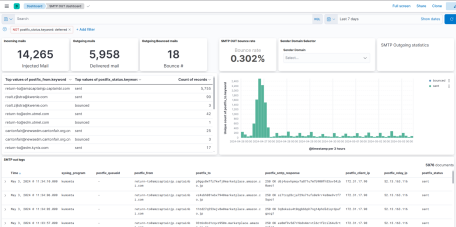
Recently I have played around with the Open Source mass mailer KumoMTA. And off course when using such a tool you want to see statistics on how the mail servers is performing.

For this I installed a logstash instance on the KumoMTA server and configured it to accept http requests. With that I was able to configure KumoMTA to inject logs using webhooks into logstash.

And with that logstash was the middleman to inject the data into Elasticsearch. Then lastly the Kibana UI was required to make some nice dashboards to show statistics on the mail performance.